Deliver articles to your favourite e-reader using Platypush
Leverage the RSS and HTML scraping capabilities of Platypush to set up automations to deliver articles to an e-reader.
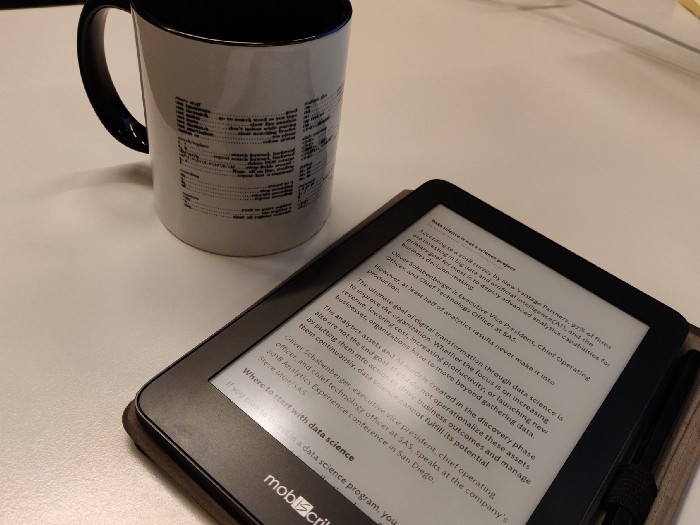
RSS feeds are a largely underestimated feature of the web nowadays — at least outside the circles of geeks. Many apps and paid services exist today to aggregate and curate news from multiple sources, often delegating the task of selecting articles and order on the screen to an opaque algorithm, and the world seem to have largely forgotten this two-decade old technology that already solved the problem of news curation and aggregation a while ago.
However, RSS (or Atom) feeds are much more omnipresent than many think - every single respectable news website provides at least one feed, albeit some news outlets may not advertise them much amid the fears of losing organic traffic. Feeds empower users with the possibility of creating their own news feeds and boards through aggregators, without relying on the mercy of a cloud-run algorithm. And their structured nature (under the hood an RSS feed is just a structured XML) offers the possibility to build automation pipelines that deliver the content we want wherever we want, whenever we want, and in whichever format we want.
IFTTT is a popular option to build custom logic on RSS feeds. It makes it very intuitive to build relatively complex rules such as “send me a weekly digest with The Economist articles published in the latest issue” or “send a telegram message with the digest from the NYT every day at 6 a.m.” or “send a notification to my mobile whenever XKCD publishes new comics.” However, IFTTT has recently pivoted to become a paid service with very limited possibility for free users to create new applets.
In my opinion, however, it’s thanks to internet-connected e-readers, such as the Kindle or MobiScribe, as well as web services like Mercury and Instapaper that can convert a web page into a clean print-friendly format, that RSS feeds can finally shine at their full brightness.
It’s great to have our news sources neatly organized in an aggregator. It’s also nice to have the possibility to configure push notifications upon the publication of new articles or daily/weekly/monthly digests delivered whenever we like.
But these features solve only the first part of the problem — the content distribution. The second part of the problem — content consumption — comes when we click on a link, delivered on whichever device and in whichever format we like, and we start reading the actual article.
Such an experience nowadays happens mostly on laptop screens or, worse, tiny smartphone screens, where we’re expected to hectically scroll through often nonmobile-optimized content filled with ads and paywalls, while a myriad of other notifications demand for their share of our attention. Reading lengthy content on a smartphone screen is arguably as bad of an experience as browsing the web on a Kindle is.
Wouldn’t it be great if we could get our favorite content automatically delivered to our favorite reading device, properly formatted and in a comfortably readable size and without all the clutter and distractions? And without having a backlit screen always in front of our eyes?
In this piece, we’ll see how to do this by using several technological tools (an e-reader, a Kindle account, the Mercury API, and Instapaper) and how to glue all the pieces together through Platypush.
Configure your Kindle account for e-mail delivery
I’ll assume in this first section you have a Kindle, a linked Amazon account, and a Gmail account that we’ll use to
programmatically send documents to the device via email - although it's also possible to leverage the mail.smtp
plugin and use another domain for delivering PDFs. We’ll later see als ohow to leverage Instapaper with other devices.
First, you’ll have to create an email address associated to your Kindle that’ll be used to remotely deliver documents:
-
Head to the Amazon content and device portal, and log in with your Amazon account.
-
Click on the second tab (“Your Devices”), and click on the context menu next to the device where your content should be delivered.
-
You’ll see the email address associated to your device. Copy it, or click on “Edit” to change it.
-
Click on the third tab (“Settings”), and scroll to the bottom to the section titled “Personal Document Settings.”
-
Scroll to the bottom to the section named “Approved Personal Document E-mail List” and add your Gmail address as a trusted source.
To check that everything works, you can now try and send a PDF document to your Kindle from your personal email address. If the device is connected to WiFi, then the document should automatically download within a few seconds.
Configure Platypush
Platypush offers all the ingredients we need for the purpose of this piece. We need, in particular, to build an automation pipeline that:
- Periodically checks a list of RSS sources for new content
- Preprocesses the new items by simplifying the web page (through the Mercury parser or Instapaper) and optionally exports them to PDF
- Programmatically sends emails to your device(s) with the new content
First, install Platypush with the required extras (any device with any compatible OS will do: a RaspberryPi, an unused laptop, or a remote server):
pip install 'platypush[http,pdf,rss,google]'
You’ll also need to install npm and mercury-parser. Postlight used to provide a web API for its parser before, but
they’ve discontinued it, choosing to make the project open-source:
apt-get install nodejs npm
npm install @postlight/mercury-parser
Second, link Platypush to your Gmail account to send documents via email:
- Create a new project on the Google Developers Console.
- Click on “Credentials” from the context menu > OAuth Client ID.
- Once generated, you can see your new credentials in the “OAuth 2.0 client IDs” section. Click on the “Download” icon to save them to a JSON file.
- Copy the file to your Platypush device/server under e.g.,
~/.credentials/client_secret.json. - Run the following command on the device to authorize the application:
python -m platypush.plugins.google.credentials \
    "https://www.googleapis.com/auth/gmail.modify" \
    ~/.credentials/client_secret.json \
    --noauth_local_webserver
- Copy the link in your browser; log in with your Google account, if required; and authorize the application.
Now that you’ve got everything in place, it’s time to configure Platypush to process your favorite feeds.
Create a rule to automatically send articles to your Kindle
The http.poll backend is a flexible
component that can be configured to poll and process updates from many web resources — JSON, RSS, Atom etc.
Suppose you want to check for updates on The Daily RSS feed twice a day and deliver a digest with the new content to your Kindle.
You’ll want to create a configuration like this in ~/.config/platypush/config.yaml:
backend.http.poll:
    requests:
        # This poll will handle an RSS feed
        - type: platypush.backend.http.request.rss.RssUpdates
          # RSS feed URL and title
          url: http://feeds.podtrac.com/zKq6WZZLTlbM
          title: NYT - The Daily
          # How often we want to check for updates
          # 12h = 43200 secs
          poll_seconds: 43200
          # We want to convert content to PDF
          digest_format: pdf
          # We want to parse and extract the content from
          # the web page using Mercury Parser
          extract_content: True
Create an event hook under ~/.config/platypush/scripts/ that reacts to a NewFeedEvent and sends the processed
content to your Kindle via email:
from platypush.event.hook import hook
from platypush.utils import run

from platypush.message.event.http.rss import NewFeedEvent

@hook(NewFeedEvent)
def on_new_feed_digest(event, **context):
    run('google.mail.compose',
        sender='you@gmail.com',
        to='your-kindle@kindle.com',
        subject=f'{event.title} feed digest',
        body=f'Your {event.title} feed digest delivered to your e-reader',
        files=[event.digest_filename])
Restart Platypush. As soon as the application finds items in the target feed that haven’t yet been processed, it’ll
parse them, convert them to PDF, trigger a NewFeedEvent that’ll be captured by your hook, and the resulting PDF will
be delivered to your Kindle.
You can add more monitored RSS sources by simply adding more items in the requests attribute of the http.poll
backend. Now enjoy reading your articles from a proper screen, delivered directly to your e-reader once or twice a day —
tiny smartphone screens, paywalls, pop-ups, and ads feel so much more old-fashioned once you dive into this new
experience.
Sharing content to your e-reader from your mobile on the fly
RSS feeds are awesome, but they aren’t the only way we discover and consume content today.
Many times we scroll through our favorite social-media timeline, bump into an interesting article, start reading it on our tiny screen, and we’d like to keep reading it later when we are on a bigger screen.
Several tools and products have spawned to provide a solution to the “parse it, save it, and read it later” problem — among those Evernote, Pocket, and Instapaper itself.
Most of them, however, are still affected by the same issue: Either they don’t do a good job at actually parsing and extracting the content in a more readable format (except for Instapaper — Pocket only saves a link to the original content, while Evernote’s content-parsing capabilities have quite some room for improvement, to say the least), or they’re still bound to the backlit screen of the smartphone or computer that runs them.
Wouldn’t it be cool to bump into an interesting article while we scroll our Facebook timeline on our Android device and with a single click deliver it to our Kindle in a nice and readable format? Let’s see how to implement such a rule in Platypush.
First, we’ll need something that runs on our mobile device to programmatically communicate with the instance of Platypush installed on our Raspberry/computer/server.
I consider Tasker one of the best applications suited for this purpose: with Tasker (and the other related apps developed by joaoapps), it’s possible to automate anything on your Android device and create sophisticated rules that connect it to anything.
There are many ways for Tasker to communicate with Platypush (direct RPC over HTTP calls, using Join with an external MQTT server to dispatch messages, using an intermediate IFTTT hook, or Pushbullet, etc.), and there are many ways for Platypush to communicate back to Tasker on your mobile device (using AutoRemote with the Platypush plugin to send custom events, using IFTTT with any service connected to your mobile, using the Join API, or, again, Pushbullet).
We’ll use Pushbullet in this piece because it doesn’t require as many configuration steps as other techniques.
-
Install Tasker, AutoShare, and Pushbullet on your Android device.
-
Go to your Pushbullet account page, and click “Create Access Token” to create a new access token that’ll be used by Platypush to listen for the messages sent to your account. Enable the Pushbullet plugin and backend on Platypush by adding these lines to
~/.config/platypush/config.yaml:
backend.pushbullet:
  token: YOUR-TOKEN
  device: platypush-device

pushbullet:
  enabled: True
Also add a procedure to ~/.config/platypush/scripts that, given an URL as input, extracts the content, converts it to
PDF, and sends it to your Kindle:
import re

from platypush.procedure import procedure
from platypush.utils import run

@procedure
def send_web_page_to_kindle(url, **context):
    # Some apps don't share only the link, but also some
    # text such as "I've found this interesting article
    # on XXX". The following action strips out extra content
    # from the input and only extracts the URL.
    url = re.sub(r"^.*(https?://[^\s]*).*", r"\1", url)

    # Extract the content through the Mercury SDK and generate a PDF
    outfile = '/tmp/extract.pdf'
    response = run('http.webpage.simplfy', url=url, outfile=outfile)
    title = response.get('title')

    # Rename the file to match the title of the page
    if title:
      new_outfile = f'/tmp/{response["title"]}.pdf'
      run('file.rename', file=outfile, name=new_outfile)
      outfile = new_outfile

    # Send the file to your Kindle email address
    run('google.mail.compose',
        sender='you@gmail.com',
        to='your-kindle@kindle.com',
        subject=f'{title or "[No Title]"} feed digest',
        body=f'Original URL: {url}',
        files=[outfile])

    # Remove the temporary file
    run('file.unlink', file=outfile)
And don't forget to also include the newly created procedure in ~/.config/platypush/scripts/__init__.py to make sure
that it's visible to the application:
from scripts.your_script import send_web_page_to_kindle
-
Restart Platypush, and check from Pushbullet that your new virtual device, platypush-device in the example above, has been created.
-
On your mobile, open AutoShare, select “Manage Commands,” and create a new command named, for example, Send to Kindle.
-
In the task associated with this trigger, tap the plus icon to add a new action, and select “Push a notification” (the action with the green Pushbullet icon next to it)
-
Select “platypush-device” as a target device, and paste the following JSON as message:
{"type":"request", "action":"procedure.send_web_page_to_kindle", "args": {"url":"%astext"}}
-
In the example above,
%astextis a special variable in Tasker that contains the text shared by the source app (in this case, the link sent to AutoShare). -
Open your browser, and go to the web link of an article you’d like to send to your Kindle. Select Share > AutoShare command > Send to Kindle.
-
The parsed article should be delivered to your e-reader in an optimized PDF format within seconds.
Using Instapaper on other Android-based e-readers
I’ve briefly mentioned Instapaper already. I really love both the service as well as the app. I consider it somehow an implementation of what Evernote should have been but has never been.
Just browse to an article on the web, click “Share to Instapaper,” and within one click, that web page will be parsed into a readable format, with all the clutter and ads removed, and it’ll be added to your account.
What makes Instapaper really interesting, though, is the fact that its Android app is really minimal (yet extremely well designed), and it runs well also on devices that run older versions of Android or aren’t that powerful.
That wouldn’t be such a big deal in itself if products like the MobiScribe weren’t slowly hitting the market — and I hope its example will be followed by others. The MobiScribe can be used both as an e-reader and as an e-ink notepad, but what really makes it interesting is that it runs Android — even if it’s an ancient Android Kit-Kat modified release , a more recent version should arrive sooner or later.
The presence of an Android OS is what makes this e-reader/tablet much more interesting than other similar products - like reMarkable, that has better specs, looks better, costs more, but has opted instead to use its own OS, limiting the possibilities to run any apps other than those developed by the company itself. Even if it’s an old version of Android that runs on an underpowered device, it’s still possible to install some apps on it — and Instapaper is one of them.
It makes it very easy to enhance your reading experience: Simply browse the web, add articles to your Instapaper account, and deliver them on the fly to your e-reader. If you want, you can also use the Instapaper API in Platypush to programmatically send content to your Instapaper account instead of your Kindle. Just create a procedure like this:
from platypush.procedure import procedure
from platypush.utils import run

@procedure
def instapaper_add(url, **context):
    run('http.request.get', url='https://www.instapaper.com/api/add',
        params={
          'url': url,
          'username': 'your_instapaper_username',
          'password': 'your_instapaper_password',
        })
I know what you're thinking - the idea of sending my credentials for a web service over a GET request give me shiver as well - but Instapaper has only recently developed an OAuth-based API and I haven't yet managed to implement it in Platypush.
This procedure is now callable through a simple JSON request:
{"type":"request", "action":"procedure.instapaper_add", "args": {"url":"https://custom-url/article"}}
If you prefer this method over the Kindle-over-email way, you can just call this procedure in the examples above to parse the content of the page and save it to your Instapaper account instead of sending an email to your Kindle address.
Conclusions
The amount of information and news channels available on the web has increased exponentially in the last years, but the methods to distribute and consume such content, at least when it comes to flexibility, haven’t improved much. The exponential growth of social media and platforms like Google News means a few large companies nowadays decide which content should appear in front of your eyes, how that content should be delivered to you, and where you can consume it.
Technology should be about creating more opportunities and flexibility, not reducing them, so such a dramatic centralization shouldn’t be acceptable for a power user. Luckily, decades-old technologies like RSS feeds can come to the rescue, allowing us to tune what we want to read and build automation pipelines that distribute the content wherever and whenever we like.
Also, e-readers are becoming more and more pervasive, thanks also to the drop in the price of e-ink displays in the last few years and to more companies and products entering the market. Automating the delivery of web content to e-readers can really create a new and more comfortable way to stay informed — and helps us find another great use case for our Kindle, other than downloading novels to read on the beach.
Reactions
How to interact with this page
Webmentions
To interact via Webmentions, send an activity that references this URL from a platform that supports Webmentions, such as Lemmy, WordPress with Webmention plugins, or any IndieWeb-compatible site.
ActivityPub
- Follow @blog@platypush.tech on your ActivityPub platform (e.g. Mastodon, Misskey, Pleroma, Lemmy).
- Mention @blog@platypush.tech in a post to feature on the Guestbook.
- Search for this URL on your instance to find and interact with the post.
- Like, boost, quote, or reply to the post to feature your activity here.