# Building a better digital reading experience
[//]: # (title: Building a better digital reading experience)
[//]: # (description: Bypass client-side restrictions on news and blog articles, archive them and read them on any offline reader)
[//]: # (image: https://s3.platypush.tech/static/images/reading-experience.jpg)
[//]: # (published: 2025-06-05)
I've always been an avid book reader as a kid.
I liked the smell of the paper, the feeling of turning the pages, and the
ability to read them anywhere I wanted, as well as lend them to friends and
later share our reading experiences.
As I grew and chose a career in tech and a digital-savvy lifestyle, I started
to shift my consumption from the paper to the screen. But I *still* wanted the
same feeling of a paper book, the same freedom of reading wherever I wanted
without distractions, and without being constantly watched by someone who will
recommend me other products based on what I read or how I read.
I was an early support of the Amazon Kindle idea. I quickly moved most of my
physical books to the Kindle, I became a vocal supporter of online magazines
that also provided Kindle subscriptions, and I started to read more and more on
e-ink devices.
Then I noticed that, after an initial spike, not many magazines and blogs
provided Kindle subscriptions or EPub versions of their articles.
So nevermind - I started tinkering my way out of it and [wrote an article in
2019](https://blog.platypush.tech/article/Deliver-articles-to-your-favourite-e-reader-using-Platypush)
on how to use [Platypush](https://platypush.tech) with its
[`rss`](https://docs.platypush.tech/platypush/plugins/rss.html),
[`instapaper`](https://docs.platypush.tech/platypush/plugins/instapaper.html) and
[`gmail`](https://docs.platypush.tech/platypush/plugins/google.mail.html)
plugins to subscribe to RSS feeds, parse new articles, convert them to PDF and
deliver them to my Kindle.
Later I moved from Kindle to the first version of the
[Mobiscribe](https://www.mobiscribe.com), as Amazon started to be more and more
restrictive in its option to import and export stuff out of the Kindle. Using
Calibre and some DRM removal tools to export articles or books I had regularly
purchased was gradually getting more cumbersome and error-prone, and the
Mobiscribe at that time was an interesting option because it offered a decent
e-ink device, for a decent price, and it ran Android (an ancient version, but
at least one that was sufficient to run [Instapaper](https://instapaper.com)
and [KOReader](https://koreader.rocks)).
That simplified things a bit because I didn't need intermediary delivery via
email to get stuff on my Kindle or Calibre to try and pull things out of it. I
was using Instapaper on all of my devices, included the Mobiscribe, I could
easily scrape and push articles to it through Platypush, and I could easily
keep track of my reading state across multiple devices.
Good things aren't supposed to last though.
Instapaper started to feel quite limited in its capabilities, and I didn't like
the idea of a centralized server holding all of my saved articles. So I've
moved to a self-hosted [Wallabag](https://wallabag.org) instance in the
meantime - which isn't perfect, but provides a lot more customization and
control.
Moreover, more and more sites started implementing client-side restrictions for
my scrapers - Instapaper was initially more affected, as it was much easier for
publisher's websites to detect scraping requests coming from the same subnet,
but slowly Wallabag too started bumping into Cloudflare screens, CAPTCHAs and
paywalls.
So the Internet Archive provided some temporary relief - I could still archive
articles there, and then instruct my Wallabag instance to read them from the
archived link.
Except that, in the past few months, the Internet Archive has also started
implementing anti-scraping features, and you'll most likely get a Cloudflare
screen if you try and access an article from an external scraper.
## An ethical note before continuing
_Feel free to skip this part and go to the technical setup section if you
already agree that, if buying isn't owning, then piracy isn't stealing._
#### Support your creators (even when you wear your pirate hat)
I _do not_ condone nor support piracy when it harms content creators.
Being a content creator myself I know how hard it is to squeeze some pennies
out of our professions or hobbies, especially in a world like the digital
one where there are often too many intermediaries to take a share of the pie.
I don't mind however harming any intermediaries that add friction to the
process just to have a piece of the pie, stubbornly rely on unsustainable
business models that sacrifices both the revenue of the authors and the privacy
and freedom of the readers, and prevent me from having a raw file that I can
download and read wherever I want just I would do with a physical book or
magazine. It's because of those folks that the digital reading experience,
despite all the initial promises, has become much worse than the analog one.
So I don't see a big moral conundrum in pirating to harm those folks and get
back my basic freedoms as a reader.
But I do support creators via Patreon. I pay for subscriptions to digital
magazines that I will anyway never read through their official app. Every now
and then I buy physical books and magazines that I've already read and that
I've really enjoyed, to support the authors, just like I still buy some vinyls
of albums I really love even though I could just stream them. And I send
one-off donations when I find that some content was particularly useful to me.
And I'd probably support content creators even more if only more of their
distribution channels allowed me to pay only for the digital content that I
want to consume, if only there was a viable digital business model also for the
occasional reader, instead of everybody trying to lock me into a Hotel
California subscription ("_you can check out any time you like, but you can
never leave_") just because their business managers are those folks who have
learned how to use the hammer of the recurring revenue, and think that every
problem in the world is a subscription nail to be hit on its head. Maybe
micropayments could be a solution, but for now cryptobros have decided that the
future of modern digital payments should be more like a gambling den for thugs,
shitcoin speculators and miners, rather than a solution to directly put in
contact content creators and consumers, bypassing all the intermediaries, and
let consumers pay only for what they consume.
#### The knowledge distribution problem
I also believe that the most popular business model behind most of the
high-quality content available online (locking people into apps and
subscriptions in order to view the content) is detrimental for the distribution
of knowledge in what's supposed to be the age of information. If I want to be
exposed to diverse opinions on what's going on in different industries or
different parts of the world, I'd probably need at least a dozen subscriptions
and a similar number of apps on my phone, all pushing notifications, while in
earlier generations folks could just walk into their local library or buy a
single book or a single issue of a newspaper every now and then.
I don't think that we should settle for a world where the best reports, the
best journalism and the most insightful blog articles are locked behind
paywalls, subscriptions and closed apps, without even a Spotify/Netflix-like
all-you-can-eat solution being considered to lower access barriers, and all
that's left for free is cheap disinformation on social media and AI-generated
content. Future historians will have a very hard time deciphering what was
going on in the world in the 2020s, because most of the high-quality content
needed to decipher our age is locked behind some kind of technological wall.
The companies that run those sites and build those apps will most likely be
gone in a few years or decades. And, if publishers also keep waging war against
folks like the Internet Archive, then future historians may really start
looking at our age like some kind of strange hyper-connected digital dark age.
#### The content consumption problem
I also think that it's my right, as a reader, to be able to consume content on
a medium without distractions - like social media buttons, ads, comments, or
other stuff that distracts me from the main content. And, if the publisher
doesn't provide me with a solution for that, and I have already paid for the
content, then I should be granted the right to build such a solution myself.
Even in an age where attention is the new currency, at least we should not try
to grab people's attention when they're trying to read some dense content. Just
like you wouldn't interrupt someone who's reading in a library saying "hey btw,
I know a shop that sells exactly the kind of tea cups described in the page
you're reading right now".
And I also demand the right to access the content I've paid however I want.
Do I want to export everything to Markdown or read it in ASCII art in a
terminal? Do I want to export it to EPUB so I can read it on my e-ink device?
Do I want to export it to PDF and email it to one of my colleagues for a research
project, or to myself for later reference? Do I want to access it without
having to use their tracker-ridden mobile app, or without being forced to see
ads despite having paid for a subscription? Well, that's my business. I firmly
believe that it's not an author's or publisher's right to dictate how I access
the content after paying for it. Just like in earlier days nobody minded if,
after purchasing a book, I would share it with my kids, or lend it to a friend,
or scan it and read it on my computer, or make the copies of a few pages to
bring to my students or my colleagues for a project, or leave it on a bench at
the park or in a public bookshelf after reading it.
If some freedoms were legally granted to me before, and now they've been taken
away, then it's not piracy if I keep demanding those freedoms. The whole point
of a market-based economy should be to keep the customer happy and give more
choice and freedom, not less, as technology advances. Otherwise the market is
probably not working as intended.
#### The content ownership problem
Content ownership is another issue in the current digital media economy.
I'll probably no longer be able to access content I've read during my
subscription period once my subscription expires, especially if it was only
available through an app. In the past I could cancel my subscription to
National Geographic at any moment, and all the copies I had purchased wouldn't
just magically disappear from my bookshelf after paying the last bill.
I'll not be able to pass on the books or magazines I've read in my lifetime to
my kid. I'll never be able to lend them to someone else, just like I would leave
a book I had read on a public bookshelf or a bench at the park for someone else
to read it.
In other words, buying now grants you a temporary license to access the content
on someone else's device - you don't really own anything.
So, if buying isn't owning, piracy isn't stealing.
And again, to make it very clear, I'll be referring to *personal use* in this
article. The case where you support creators through other means, but the
distribution channel and the business models are the problem, and you just
want your basic freedoms as a content consumer back.
If however you want to share scraped articles on the Web, or even worse profit
from access to it without sharing those profits with the creators, then you're
*really* doing the kind of piracy I can't condone.
With this out of the way, let's get our hands dirty.
## The setup
A high-level overview of the setup is as follows:
 Let's break down the building blocks of this setup:
- **[Redirector](https://addons.mozilla.org/en-US/firefox/addon/redirector/)**
is a browser extension that allows you to redirect URLs based on custom
rules as soon as the page is loaded. This is useful to redirect paywalled
resources to the Internet Archive, which usually stores full copies of the
content. Even if you regularly paid for a subscription to a magazine, and you
can read the article on the publisher's site or from their app, your Wallabag
scraper will still be blocked if the site implements client-side restrictions
or is protected by Cloudflare. So you need to redirect the URL to the Internet
Archive, which will then return a copy of the article that you can scrape.
- **[Platypush](https://platypush.tech)** is a Python-based general-purpose
platform for automation that I've devoted a good chunk of the past decade
to develop. It allows you to run actions, react to events and control devices
and services through a unified API and Web interface, and it comes with
[hundreds of supported integrations](https://docs.platypush.tech). We'll use
the [`wallabag`](https://docs.platypush.tech/platypush/plugins/wallabag.html)
plugin to push articles to your Wallabag instance, and optionally the
[`rss`](https://docs.platypush.tech/platypush/plugins/rss.html) plugin if you
want to programmatically subscribe to RSS feeds, scrape articles and archive
them to Wallabag, and the
[`ntfy`](https://docs.platypush.tech/platypush/plugins/ntfy.html) plugin to
optionally send notifications to your mobile device when new articles are
available.
- **[Platypush Web extension](https://addons.mozilla.org/en-US/firefox/addon/platypush/)**
is a browser extension that allows you to interact with Platypush from your
browser, and it also provides a powerful JavaScript API that you can leverage
to manipulate the DOM and automate tasks in the browser. It's like a
[Greasemonkey](https://addons.mozilla.org/en-US/firefox/addon/greasemonkey/)
or [Tampermonkey](https://addons.mozilla.org/en-US/firefox/addon/tampermonkey/)
extension that allows you to write scripts to customize your browser
experience, but it also allows you to interact with Platypush and leverage
its backend capabilities. On top of that, I've also added built-in support
for the [Mercury Parser API](https://github.com/usr42/mercury-parser) in it,
so you can easily distill articles - similar to what Firefox does with its
[Reader
Mode](https://support.mozilla.org/en-US/kb/firefox-reader-view-clutter-free-web-pages),
but in this case you can customize the layout and modify the original DOM
directly, and the distilled content can easily be dispatched to any other
service or application. We'll use it to:
- Distill the article content from the page, removing all the
unnecessary elements (ads, comments, etc.) and leaving only the main text
and images.
- Archive the distilled article to Wallabag, so you can read it later
from any device that has access to your Wallabag instance.
- **[Wallabag](https://wallabag.org)** is a self-hosted read-it-later
service that allows you to save articles from the Web and read them later,
even offline. It resembles the features of the ([recently
defunct](https://support.mozilla.org/en-US/kb/future-of-pocket))
[Pocket](https://getpocket.com/home). It provides a Web interface, mobile
apps and browser extensions to access your saved articles, and it can also be
used as a backend for scraping articles from the Web.
- (_Optional_) **[KOReader](https://koreader.rocks)** is an
open-source e-book reader that runs on a variety of devices, including any
e-ink readers that run Android (and even the
[Remarkable](https://github.com/koreader/koreader/wiki/Installation-on-Remarkable)).
It has a quite minimal interface and it may take a while to get used to, but
it's extremely powerful and customizable. I personally prefer it over the
official Wallabag app - it has a native Wallabag integration, as well as OPDS
integration to synchronize with my
[Ubooquity](https://docs.linuxserver.io/images/docker-ubooquity/) server,
synchronization of highlights and notes to Nextcloud Notes, WebDAV support
(so you can access anything hosted on e.g. your Nextcloud instance), progress
sync across devices through their [sync
server](https://github.com/koreader/koreader-sync-server), and much more. It
basically gives you a single app to access your saved articles, your books,
your notes, your highlights, and your documents.
- (_Optional_) An Android-based e-book reader to run KOReader on. I have
recently switched from my old Mobiscribe to an [Onyx BOOX Note Air
4](https://www.onyxbooxusa.com/onyx-boox-note-air4-c) and I love it. It's
powerful, the display is great, it runs basically any Android app out there
(and I've had no issues with running any apps installed through
[F-Droid](https://f-droid.org)), and it also has a good set of stock apps,
and most of them support WebDAV synchronization - ideal if you have a
[Nextcloud](https://nextcloud.com) instance to store your documents and
archived links.
**NOTE**: The Platypush extension only works with Firefox, on any Firefox-based
browser, or on any browser out there that still supports the [Manifest
V2](https://blog.mozilla.org/addons/2024/03/13/manifest-v3-manifest-v2-march-2024-update/).
The Manifest V3 has been a disgrace that Google has forced all browser
extension developers to swallow. I won't go in detail here, but the Platypush
extension needs to be able to perform actions (such as calls to custom remote
endpoints and runtime interception of HTTP headers) that are either no longer
supported on Manifest V3, or that are only supported through laborious
workarounds (such as using the declarative Net Request API to explicitly
define what you want to intercept and what remote endpoints you want to call).
**NOTE 2**: As of June 2025, the Platypush extension is only supported on
Firefox for desktop. A Firefox for Android version [is
work in progress](https://git.platypush.tech/platypush/platypush-webext/issues/1).
Let's dig deeper into the individual components of this setup.
## Redirector

This is a nice addition if you want to automatically view some links through
the Internet Archive rather than the original site.
You can install it from the [Firefox Add-ons site](https://addons.mozilla.org/en-US/firefox/addon/redirector/).
Once installed, you can create a bunch of rules (regular expressions are supported)
to redirect URLs from paywalled domains that you visit often to the Internet Archive.
For example, this regular expression:
```
^(https://([\w-]+).substack.com/p/.*)
```
will match any Substack article URL, and you can redirect it to the Internet Archive
through this URL:
```
https://archive.is/$1
```
Next time you open a Substack article, it will be automatically redirected to its
most recent archived version - or it will prompt you to archive the URL if it's not
been archived yet.
## Wallabag

Wallabag can easily be installed on any server [through Docker](https://doc.wallabag.org/developer/docker/).
Follow the documentation for the set up of your user and create an API token
from the Web interface.
It's also advised to [set up a reverse
proxy](https://doc.wallabag.org/admin/installation/virtualhosts/#configuration-on-nginx)
in front of Wallabag, so you can easily access it over HTTPS.
Once configured the reverse proxy, you can generate a certificate for it - for
example, if you use [`certbot`](https://certbot.eff.org/) and `nginx`:
```bash
❯ certbot --nginx -d your-domain.com
```
Then you can access your Wallabag instance at `https://your-domain.com` and log
in with the user you created.
Bonus: I personally find the Web interface of Wallabag quite ugly - the
fluorescent light blue headers are distracting and the default font and column
width isn't ideal for my taste. So I made a [Greasemonkey/Tampermonkey
script](https://gist.manganiello.tech/fabio/ec9e28170988441d9a091b3fa6535038)
to make it better if you want (see screenshot above).
## [_Optional_] ntfy
[ntfy](https://ntfy.sh) is a simple HTTP-based pub/sub notification service
that you can use to send notifications to your devices or your browser. It
provides both an [Android app](https://f-droid.org/en/packages/io.heckel.ntfy/)
and a [browser
addon](https://addons.mozilla.org/en-US/firefox/addon/send-to-ntfy/) to send
and receive notifications, allowing you to open saved links directly on your
phone or any other device subscribed to the same topic.
Running it via docker-compose [is quite
straightforward](https://github.com/binwiederhier/ntfy/blob/main/docker-compose.yml).
It's also advised to serve it behind a reverse proxy with HTTPS support,
keeping in mind to set the right header for the Websocket paths - example nginx
configuration:
```nginx
map $http_upgrade $connection_upgrade {
default upgrade;
'' close;
}
server {
server_name notify.example.com;
location / {
proxy_pass http://your-internal-ntfy-host:port;
client_max_body_size 5M;
proxy_read_timeout 60;
proxy_connect_timeout 60;
proxy_redirect off;
proxy_set_header Host $http_host;
proxy_set_header X-Real-IP $remote_addr;
proxy_set_header X-Forwarded-Ssl on;
proxy_set_header X-Forwarded-For $proxy_add_x_forwarded_for;
}
location ~ .*/ws/?$ {
proxy_http_version 1.1;
proxy_set_header Upgrade $http_upgrade;
proxy_set_header Connection $connection_upgrade;
proxy_set_header Host $http_host;
proxy_pass http://your-internal-ntfy-host:port;
}
}
```
Once the server is running, you can check the connectivity by opening your
server's main page in your browser.
**NOTE**: Be _careful_ when choosing your ntfy topic name, especially if you
are using a public instance. ntfy by default doesn't require any authentication
for publishing or subscribing to a topic. So choose a random name (or at least
a random prefix/suffix) for your topics and treat them like a password.
## Platypush
Create a new virtual environment and install Platypush through `pip` (the
plugins we'll use in the first part don't require any additional dependencies):
```bash
❯ python3 -m venv venv
❯ source venv/bin/activate
❯ pip install platypush
```
Then create a new configuration file `~/.config/platypush/config.yaml` with the
following configuration:
```yaml
backend.http:
# port: 8008
# Wallabag configuration
wallabag:
server_url: https://your-domain.com
client_id: your_client_id
client_secret: your_client_secret
# Your Wallabag user credentials are required for the first login.
# It's also advised to keep them here afterwards so the refresh
# token can be automatically updated.
username: your_username
password: your_password
```
Then you can start the service with:
```bash
❯ platypush
```
You can also create a systemd service to run Platypush in the background:
```bash
❯ mkdir -p ~/.config/systemd/user
❯ cat < ~/.config/systemd/user/platypush.service
[Unit]
Description=Platypush service
After=network.target
[Service]
ExecStart=/path/to/venv/bin/platypush
Restart=always
RestartSec=5
EOF
❯ systemctl --user daemon-reload
❯ systemctl --user enable --now platypush.service
```
After starting the service, head over to `http://your_platypush_host:8008` (or
the port you configured in the `backend.http` section) and create a new user
account.
It's also advised to serve the Platypush Web server behind a reverse proxy with
HTTPS support if you want it to easily be accessible from the browser extension -
a basic `nginx` configuration [is available on the
repo](https://git.platypush.tech/platypush/platypush/src/branch/master/examples/nginx/nginx.sample.conf).
## Platypush Web extension
You can install the Platypush Web extension from the [Firefox Add-ons
site](https://addons.mozilla.org/en-US/firefox/addon/platypush/).
After installing it, click on the extension popup and add the URL of your
Platypush Web server.

When successfully connected, you should see the device in the main menu, you
can run commands on it and save actions.
A good place to start familiarizing with the Platypush API is the _Run Action_
dialog, which allows you to run commands on your server and provides
autocomplete for the available actions, as well as documentation about their
arguments.

The default action mode is _Request_ (i.e. single requests against the API).
You can also pack together more actions on the backend [into
_procedures_](https://docs.platypush.tech/wiki/Quickstart.html#greet-me-with-lights-and-music-when-i-come-home),
which can be written either in the YAML config or as Python scripts (by default
loaded from `~/.config/platypush/scripts`). If correctly configured, procedures
will be available in the _Run Action_ dialog.
The other mode, which we'll use in this article, is _Script_. In this mode you
can write custom JavaScript code that can interact with your browser.
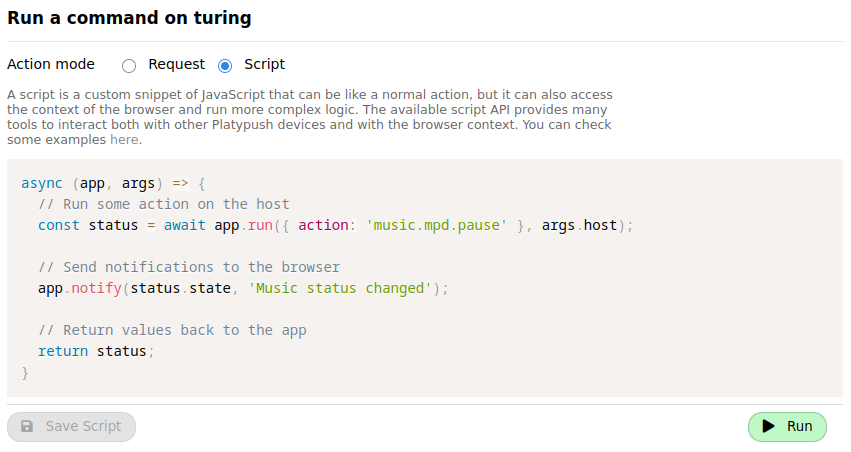
[Here](https://gist.github.com/BlackLight/d80c571705215924abc06a80994fd5f4) is
a sample script that you can use as a reference for the API exposed by the
extension. Some examples include:
- `app.run`, to run an action on the Platypush backend
- `app.getURL`, `app.setURL` and `app.openTab` to get and set the current URL,
or open a new tab with a given URL
- `app.axios.get`, `app.axios.post` etc. to perform HTTP requests to other
external services through the Axios library
- `app.getDOM` and `app.setDOM` to get and set the current page DOM
- `app.mercury.parse` to distill the current page content using the Mercury
Parser API
### Reader Mode script
We can put together the building blocks above to create our first script, which
will distill the current page content and swap the current page DOM with the
simplified content - with no ads, comments, or other distracting visual
elements. The full content of the script is available
[here](https://gist.manganiello.tech/fabio/c731b57ff6b24d21a8f43fbedde3dc30).
This is akin to what Firefox' [Reader
Mode](https://support.mozilla.org/en-US/kb/firefox-reader-view-clutter-free-web-pages)
does, but with much more room for customization.
Note that for this specific script we don't need any interactions with the
Platypush backend. Everything happens on the client, as the Mercury API is
built into the Platypush Web extension.
Switch to _Script_ mode in the _Run Action_ dialog, paste the script content
and click on _Save Script_. You can also choose a custom name, icon
([FontAwesome](https://fontawesome.com/icons) icon classes are supported),
color and group for the script. Quite importantly, you can also associate a
keyboard shortcut to it, so you can quickly distill a page without having to
search for the command either in the extension popup or in the context menu.
### Save to Wallabag script
Now that we have a script to distill the current page content, we can create
another script to save the distilled content (if available) to Wallabag.
Otherwise, it will just save the original page content.
The full content of the script is available
[here](https://gist.manganiello.tech/fabio/8f5b08d8fbaa404bafc6fdeaf9b154b4).
The structure is quite straightforward:
- First, it checks if the page content has already been "distilled" by the
Reader Mode script. If so, it uses the distilled content to save it to
Wallabag. Otherwise, it will use the full page body.
- It saves the URL to Wallabag.
- Optionally, it sends a notification over ntfy.
Again, feel free to assign a keybinding to this action so you can quickly call
it from any page.
Personally I've picked `Ctrl+Alt+1` for the Reader Mode script and `Ctrl+Alt+2`
for the Save to Wallabag script, so I can quickly distill a page and, if takes
me more time to read it, send the already simplified content to Wallabag.
If you don't want to create a keybinding, you can always call these actions
either from the extension popup or from the (right click) context menu.
## [_Optional_] RSS subscriptions and automated delivery
You now have a way to manually scrape and archive articles from the Web.
If you are also a regular reader of a publication or a blog that provides RSS
or Atom feeds, you can also automate the process of subscribing to those feeds
and delivering new articles to Wallabag.
Just keep in mind two things if you want to go down this way:
1. It's not advised to subscribe to feeds that provide a lot of articles
every day, as this will quickly fill up your Wallabag instance and make it
hard to find the articles you want to read. So stick to feeds that provide
one or a few articles per day, or at least don't provide more than a dozen
articles per day. Or augment the RSS event hook with custom filters to only
include links that match some criteria.
2. Unlike the manual actions we saw before, the logic to handle automated
subscriptions and content delivery is implemented on the Platypush service
(on the backend). So it may not be as optimal in scraping and distilling
articles as some logic that operates on the client side and can more easily
bypass client-side restrictions. So you may want to pick feeds that don't
implement aggressive paywalls, are behind Cloudflare, or implement other
client-side restrictions.
If you have some good candidates for automated delivery, follow these steps:
- Install the [`rss`](https://docs.platypush.tech/platypush/plugins/rss.html)
plugin in your Platypush instance:
```bash
(venv)> pip install 'platypush[rss]'
```
- If you want to use the Mercury Parser API to distill articles (_optional_),
install the dependencies for the
[`http.webpage`](https://docs.platypush.tech/platypush/plugins/http.webpage.html).
The Mercury API is only available in JavaScript, so you'll need to have
`nodejs` and `npm` installed on your system. The Mercury Parser API is optional,
but it's usually more successful than the default Wallabag scraper in distilling
content. And, on top of that, it also makes it easier to customize your
requests. So if you want to scrape content from paywalled websites that
you're subscribed to you can easily pass your credentials or cookies to the
Mercury API (Wallabag doesn't support customizing the scraping requests).
Moreover, the Mercury integration also allows you to export the distilled
content to other formats, such as plain text, HTML, Markdown, or PDF - this
is useful if you want to save content to other services or applications. For
example, I find it quite useful to scrape content from some articles in
Markdown, and then save it to my [Nextcloud
Notes](https://apps.nextcloud.com/apps/notes) or
[Obsidian](https://obsidian.md).
```bash
# Example for Debian/Ubuntu
❯ [sudo] apt install nodejs npm
# Install Mercury Parser globally
❯ [sudo] npm install -g @postlight/parser
```
- Add your subscriptions to the `~/.config/platypush/config.yaml` file:
```yaml
rss:
subscriptions:
- https://example.com/feed.xml
- https://example.com/atom.xml
# Optional
# http.webpage
# headers:
# # These headers will be used in all the requests made by the Mercury Parser.
# # You can still override the headers when you call the `http.webpage.simplify`
# # action though.
# User-Agent: "Mozilla/5.0 (Windows NT 10.0; Win64; x64) AppleWebKit/537.36 (KHTML, like Gecko) Chrome/58.0.3029.110 Safari/537.3"
```
- Create an event hook to handle new articles from the RSS feed and
distill them using the Mercury Parser API. You can e.g. create a
`~/.config/platypush/scripts/subscriptions.py` file with the following
content:
```python
import logging
import urllib.parse
from platypush import run, when
from platypush.events.rss import NewFeedEntryEvent
logger = logging.getLogger(__name__)
# Optional, set the False if you don't want to use the Mercury Parser API
USE_MERCURY_PARSER = True
# If there are any websites that require specific headers to be passed,
# for example paywalled news sites that you're subscribed to and require
# authentication, you can specify them here.
headers_by_domain = {
'example.com': {
'Accept': 'text/html,application/xhtml+xml,application/xml;q=0.9,image/avif,image/webp,*/*;q=0.8',
'Accept-Language': 'en-US,en;q=0.5',
'Cookie': 'sessionid=your_cookie_value; other_cookie=other_value',
},
}
def get_headers(url: str) -> dict:
"""
Get the headers to use for the request based on the URL.
"""
domain = re.sub(r'^www\.', '', urllib.parse.urlparse(url).netloc)
return headers_by_domain.get(domain, {})
@when(NewFeedEntryEvent)
def scrape_and_save(event: NewFeedEntryEvent, **_):
"""
Scrape and save the new article to Wallabag.
"""
content = None
logger.info(
'New article available on %s - title: %s, url: %s',
event.feed_url,
event.title,
event.url
)
if USE_MERCURY_PARSER:
# Distill the article content using the Mercury Parser API
response = run(
'http.webpage.simplify',
url=url,
format='html',
headers=get_headers(event.url),
)
if not (response and response.get('content')):
logger.warning(f'Failed to distill {url} through Mercury Parser')
else:
content = response['content']
# Save the distilled content to Wallabag
run(
'wallabag.save',
title=event.entry.title,
content=content,
url=url,
)
logger.info(f'Saved {url} to Wallabag')
```
It is advised to run the Platypush script once _without_ the `@when` hook
above, but with the `rss` plugin configured.
The reason is that, on the first run, the `rss` plugin will fetch all the
entries in the subscribed feeds and trigger the `NewFeedEntryEvent` for each
of them. That in turn could end up with hundreds of articles pushed
simultaneously to your Wallabag instance, you may not want that.
The recommended flow instead (which should probably apply also any time you add
new feeds to your subscriptions) is:
1. Add the feeds to your `rss` plugin configuration.
2. Restart the Platypush service and let it process all the `NewFeedEntryEvent`
events for the existing articles.
3. Add the event hook logic to any file under `~/.config/platypush/scripts`.
4. Restart the service - now only new entries will trigger the events.
## Conclusions
In this article we have seen how to set up a self-hosted solution to scrape and
archive articles from the Web, and also how to automate the process through
feed subscriptions.
This is a powerful way to regain control over your reading experience, hopefully
bringing it one step closer to the one you had with paper books or walks to the
local library.
Just remember to do so responsibly, only for personal use, and respecting the
rights of content creators and publishers.
It's fine to get creative and build your own reading experience by bypassing
all the needless friction that has been added as media has moved to the digital
space.
But always remember to fund authors and creators in other ways, subscribe to
those who produce high-quality content (even if you don't read content from
their mobile app), and try to limit your scraping experience to personal use.
Let's break down the building blocks of this setup:
- **[Redirector](https://addons.mozilla.org/en-US/firefox/addon/redirector/)**
is a browser extension that allows you to redirect URLs based on custom
rules as soon as the page is loaded. This is useful to redirect paywalled
resources to the Internet Archive, which usually stores full copies of the
content. Even if you regularly paid for a subscription to a magazine, and you
can read the article on the publisher's site or from their app, your Wallabag
scraper will still be blocked if the site implements client-side restrictions
or is protected by Cloudflare. So you need to redirect the URL to the Internet
Archive, which will then return a copy of the article that you can scrape.
- **[Platypush](https://platypush.tech)** is a Python-based general-purpose
platform for automation that I've devoted a good chunk of the past decade
to develop. It allows you to run actions, react to events and control devices
and services through a unified API and Web interface, and it comes with
[hundreds of supported integrations](https://docs.platypush.tech). We'll use
the [`wallabag`](https://docs.platypush.tech/platypush/plugins/wallabag.html)
plugin to push articles to your Wallabag instance, and optionally the
[`rss`](https://docs.platypush.tech/platypush/plugins/rss.html) plugin if you
want to programmatically subscribe to RSS feeds, scrape articles and archive
them to Wallabag, and the
[`ntfy`](https://docs.platypush.tech/platypush/plugins/ntfy.html) plugin to
optionally send notifications to your mobile device when new articles are
available.
- **[Platypush Web extension](https://addons.mozilla.org/en-US/firefox/addon/platypush/)**
is a browser extension that allows you to interact with Platypush from your
browser, and it also provides a powerful JavaScript API that you can leverage
to manipulate the DOM and automate tasks in the browser. It's like a
[Greasemonkey](https://addons.mozilla.org/en-US/firefox/addon/greasemonkey/)
or [Tampermonkey](https://addons.mozilla.org/en-US/firefox/addon/tampermonkey/)
extension that allows you to write scripts to customize your browser
experience, but it also allows you to interact with Platypush and leverage
its backend capabilities. On top of that, I've also added built-in support
for the [Mercury Parser API](https://github.com/usr42/mercury-parser) in it,
so you can easily distill articles - similar to what Firefox does with its
[Reader
Mode](https://support.mozilla.org/en-US/kb/firefox-reader-view-clutter-free-web-pages),
but in this case you can customize the layout and modify the original DOM
directly, and the distilled content can easily be dispatched to any other
service or application. We'll use it to:
- Distill the article content from the page, removing all the
unnecessary elements (ads, comments, etc.) and leaving only the main text
and images.
- Archive the distilled article to Wallabag, so you can read it later
from any device that has access to your Wallabag instance.
- **[Wallabag](https://wallabag.org)** is a self-hosted read-it-later
service that allows you to save articles from the Web and read them later,
even offline. It resembles the features of the ([recently
defunct](https://support.mozilla.org/en-US/kb/future-of-pocket))
[Pocket](https://getpocket.com/home). It provides a Web interface, mobile
apps and browser extensions to access your saved articles, and it can also be
used as a backend for scraping articles from the Web.
- (_Optional_) **[KOReader](https://koreader.rocks)** is an
open-source e-book reader that runs on a variety of devices, including any
e-ink readers that run Android (and even the
[Remarkable](https://github.com/koreader/koreader/wiki/Installation-on-Remarkable)).
It has a quite minimal interface and it may take a while to get used to, but
it's extremely powerful and customizable. I personally prefer it over the
official Wallabag app - it has a native Wallabag integration, as well as OPDS
integration to synchronize with my
[Ubooquity](https://docs.linuxserver.io/images/docker-ubooquity/) server,
synchronization of highlights and notes to Nextcloud Notes, WebDAV support
(so you can access anything hosted on e.g. your Nextcloud instance), progress
sync across devices through their [sync
server](https://github.com/koreader/koreader-sync-server), and much more. It
basically gives you a single app to access your saved articles, your books,
your notes, your highlights, and your documents.
- (_Optional_) An Android-based e-book reader to run KOReader on. I have
recently switched from my old Mobiscribe to an [Onyx BOOX Note Air
4](https://www.onyxbooxusa.com/onyx-boox-note-air4-c) and I love it. It's
powerful, the display is great, it runs basically any Android app out there
(and I've had no issues with running any apps installed through
[F-Droid](https://f-droid.org)), and it also has a good set of stock apps,
and most of them support WebDAV synchronization - ideal if you have a
[Nextcloud](https://nextcloud.com) instance to store your documents and
archived links.
**NOTE**: The Platypush extension only works with Firefox, on any Firefox-based
browser, or on any browser out there that still supports the [Manifest
V2](https://blog.mozilla.org/addons/2024/03/13/manifest-v3-manifest-v2-march-2024-update/).
The Manifest V3 has been a disgrace that Google has forced all browser
extension developers to swallow. I won't go in detail here, but the Platypush
extension needs to be able to perform actions (such as calls to custom remote
endpoints and runtime interception of HTTP headers) that are either no longer
supported on Manifest V3, or that are only supported through laborious
workarounds (such as using the declarative Net Request API to explicitly
define what you want to intercept and what remote endpoints you want to call).
**NOTE 2**: As of June 2025, the Platypush extension is only supported on
Firefox for desktop. A Firefox for Android version [is
work in progress](https://git.platypush.tech/platypush/platypush-webext/issues/1).
Let's dig deeper into the individual components of this setup.
## Redirector

This is a nice addition if you want to automatically view some links through
the Internet Archive rather than the original site.
You can install it from the [Firefox Add-ons site](https://addons.mozilla.org/en-US/firefox/addon/redirector/).
Once installed, you can create a bunch of rules (regular expressions are supported)
to redirect URLs from paywalled domains that you visit often to the Internet Archive.
For example, this regular expression:
```
^(https://([\w-]+).substack.com/p/.*)
```
will match any Substack article URL, and you can redirect it to the Internet Archive
through this URL:
```
https://archive.is/$1
```
Next time you open a Substack article, it will be automatically redirected to its
most recent archived version - or it will prompt you to archive the URL if it's not
been archived yet.
## Wallabag

Wallabag can easily be installed on any server [through Docker](https://doc.wallabag.org/developer/docker/).
Follow the documentation for the set up of your user and create an API token
from the Web interface.
It's also advised to [set up a reverse
proxy](https://doc.wallabag.org/admin/installation/virtualhosts/#configuration-on-nginx)
in front of Wallabag, so you can easily access it over HTTPS.
Once configured the reverse proxy, you can generate a certificate for it - for
example, if you use [`certbot`](https://certbot.eff.org/) and `nginx`:
```bash
❯ certbot --nginx -d your-domain.com
```
Then you can access your Wallabag instance at `https://your-domain.com` and log
in with the user you created.
Bonus: I personally find the Web interface of Wallabag quite ugly - the
fluorescent light blue headers are distracting and the default font and column
width isn't ideal for my taste. So I made a [Greasemonkey/Tampermonkey
script](https://gist.manganiello.tech/fabio/ec9e28170988441d9a091b3fa6535038)
to make it better if you want (see screenshot above).
## [_Optional_] ntfy
[ntfy](https://ntfy.sh) is a simple HTTP-based pub/sub notification service
that you can use to send notifications to your devices or your browser. It
provides both an [Android app](https://f-droid.org/en/packages/io.heckel.ntfy/)
and a [browser
addon](https://addons.mozilla.org/en-US/firefox/addon/send-to-ntfy/) to send
and receive notifications, allowing you to open saved links directly on your
phone or any other device subscribed to the same topic.
Running it via docker-compose [is quite
straightforward](https://github.com/binwiederhier/ntfy/blob/main/docker-compose.yml).
It's also advised to serve it behind a reverse proxy with HTTPS support,
keeping in mind to set the right header for the Websocket paths - example nginx
configuration:
```nginx
map $http_upgrade $connection_upgrade {
default upgrade;
'' close;
}
server {
server_name notify.example.com;
location / {
proxy_pass http://your-internal-ntfy-host:port;
client_max_body_size 5M;
proxy_read_timeout 60;
proxy_connect_timeout 60;
proxy_redirect off;
proxy_set_header Host $http_host;
proxy_set_header X-Real-IP $remote_addr;
proxy_set_header X-Forwarded-Ssl on;
proxy_set_header X-Forwarded-For $proxy_add_x_forwarded_for;
}
location ~ .*/ws/?$ {
proxy_http_version 1.1;
proxy_set_header Upgrade $http_upgrade;
proxy_set_header Connection $connection_upgrade;
proxy_set_header Host $http_host;
proxy_pass http://your-internal-ntfy-host:port;
}
}
```
Once the server is running, you can check the connectivity by opening your
server's main page in your browser.
**NOTE**: Be _careful_ when choosing your ntfy topic name, especially if you
are using a public instance. ntfy by default doesn't require any authentication
for publishing or subscribing to a topic. So choose a random name (or at least
a random prefix/suffix) for your topics and treat them like a password.
## Platypush
Create a new virtual environment and install Platypush through `pip` (the
plugins we'll use in the first part don't require any additional dependencies):
```bash
❯ python3 -m venv venv
❯ source venv/bin/activate
❯ pip install platypush
```
Then create a new configuration file `~/.config/platypush/config.yaml` with the
following configuration:
```yaml
backend.http:
# port: 8008
# Wallabag configuration
wallabag:
server_url: https://your-domain.com
client_id: your_client_id
client_secret: your_client_secret
# Your Wallabag user credentials are required for the first login.
# It's also advised to keep them here afterwards so the refresh
# token can be automatically updated.
username: your_username
password: your_password
```
Then you can start the service with:
```bash
❯ platypush
```
You can also create a systemd service to run Platypush in the background:
```bash
❯ mkdir -p ~/.config/systemd/user
❯ cat < ~/.config/systemd/user/platypush.service
[Unit]
Description=Platypush service
After=network.target
[Service]
ExecStart=/path/to/venv/bin/platypush
Restart=always
RestartSec=5
EOF
❯ systemctl --user daemon-reload
❯ systemctl --user enable --now platypush.service
```
After starting the service, head over to `http://your_platypush_host:8008` (or
the port you configured in the `backend.http` section) and create a new user
account.
It's also advised to serve the Platypush Web server behind a reverse proxy with
HTTPS support if you want it to easily be accessible from the browser extension -
a basic `nginx` configuration [is available on the
repo](https://git.platypush.tech/platypush/platypush/src/branch/master/examples/nginx/nginx.sample.conf).
## Platypush Web extension
You can install the Platypush Web extension from the [Firefox Add-ons
site](https://addons.mozilla.org/en-US/firefox/addon/platypush/).
After installing it, click on the extension popup and add the URL of your
Platypush Web server.

When successfully connected, you should see the device in the main menu, you
can run commands on it and save actions.
A good place to start familiarizing with the Platypush API is the _Run Action_
dialog, which allows you to run commands on your server and provides
autocomplete for the available actions, as well as documentation about their
arguments.

The default action mode is _Request_ (i.e. single requests against the API).
You can also pack together more actions on the backend [into
_procedures_](https://docs.platypush.tech/wiki/Quickstart.html#greet-me-with-lights-and-music-when-i-come-home),
which can be written either in the YAML config or as Python scripts (by default
loaded from `~/.config/platypush/scripts`). If correctly configured, procedures
will be available in the _Run Action_ dialog.
The other mode, which we'll use in this article, is _Script_. In this mode you
can write custom JavaScript code that can interact with your browser.

[Here](https://gist.github.com/BlackLight/d80c571705215924abc06a80994fd5f4) is
a sample script that you can use as a reference for the API exposed by the
extension. Some examples include:
- `app.run`, to run an action on the Platypush backend
- `app.getURL`, `app.setURL` and `app.openTab` to get and set the current URL,
or open a new tab with a given URL
- `app.axios.get`, `app.axios.post` etc. to perform HTTP requests to other
external services through the Axios library
- `app.getDOM` and `app.setDOM` to get and set the current page DOM
- `app.mercury.parse` to distill the current page content using the Mercury
Parser API
### Reader Mode script
We can put together the building blocks above to create our first script, which
will distill the current page content and swap the current page DOM with the
simplified content - with no ads, comments, or other distracting visual
elements. The full content of the script is available
[here](https://gist.manganiello.tech/fabio/c731b57ff6b24d21a8f43fbedde3dc30).
This is akin to what Firefox' [Reader
Mode](https://support.mozilla.org/en-US/kb/firefox-reader-view-clutter-free-web-pages)
does, but with much more room for customization.
Note that for this specific script we don't need any interactions with the
Platypush backend. Everything happens on the client, as the Mercury API is
built into the Platypush Web extension.
Switch to _Script_ mode in the _Run Action_ dialog, paste the script content
and click on _Save Script_. You can also choose a custom name, icon
([FontAwesome](https://fontawesome.com/icons) icon classes are supported),
color and group for the script. Quite importantly, you can also associate a
keyboard shortcut to it, so you can quickly distill a page without having to
search for the command either in the extension popup or in the context menu.
### Save to Wallabag script
Now that we have a script to distill the current page content, we can create
another script to save the distilled content (if available) to Wallabag.
Otherwise, it will just save the original page content.
The full content of the script is available
[here](https://gist.manganiello.tech/fabio/8f5b08d8fbaa404bafc6fdeaf9b154b4).
The structure is quite straightforward:
- First, it checks if the page content has already been "distilled" by the
Reader Mode script. If so, it uses the distilled content to save it to
Wallabag. Otherwise, it will use the full page body.
- It saves the URL to Wallabag.
- Optionally, it sends a notification over ntfy.
Again, feel free to assign a keybinding to this action so you can quickly call
it from any page.
Personally I've picked `Ctrl+Alt+1` for the Reader Mode script and `Ctrl+Alt+2`
for the Save to Wallabag script, so I can quickly distill a page and, if takes
me more time to read it, send the already simplified content to Wallabag.
If you don't want to create a keybinding, you can always call these actions
either from the extension popup or from the (right click) context menu.
## [_Optional_] RSS subscriptions and automated delivery
You now have a way to manually scrape and archive articles from the Web.
If you are also a regular reader of a publication or a blog that provides RSS
or Atom feeds, you can also automate the process of subscribing to those feeds
and delivering new articles to Wallabag.
Just keep in mind two things if you want to go down this way:
1. It's not advised to subscribe to feeds that provide a lot of articles
every day, as this will quickly fill up your Wallabag instance and make it
hard to find the articles you want to read. So stick to feeds that provide
one or a few articles per day, or at least don't provide more than a dozen
articles per day. Or augment the RSS event hook with custom filters to only
include links that match some criteria.
2. Unlike the manual actions we saw before, the logic to handle automated
subscriptions and content delivery is implemented on the Platypush service
(on the backend). So it may not be as optimal in scraping and distilling
articles as some logic that operates on the client side and can more easily
bypass client-side restrictions. So you may want to pick feeds that don't
implement aggressive paywalls, are behind Cloudflare, or implement other
client-side restrictions.
If you have some good candidates for automated delivery, follow these steps:
- Install the [`rss`](https://docs.platypush.tech/platypush/plugins/rss.html)
plugin in your Platypush instance:
```bash
(venv)> pip install 'platypush[rss]'
```
- If you want to use the Mercury Parser API to distill articles (_optional_),
install the dependencies for the
[`http.webpage`](https://docs.platypush.tech/platypush/plugins/http.webpage.html).
The Mercury API is only available in JavaScript, so you'll need to have
`nodejs` and `npm` installed on your system. The Mercury Parser API is optional,
but it's usually more successful than the default Wallabag scraper in distilling
content. And, on top of that, it also makes it easier to customize your
requests. So if you want to scrape content from paywalled websites that
you're subscribed to you can easily pass your credentials or cookies to the
Mercury API (Wallabag doesn't support customizing the scraping requests).
Moreover, the Mercury integration also allows you to export the distilled
content to other formats, such as plain text, HTML, Markdown, or PDF - this
is useful if you want to save content to other services or applications. For
example, I find it quite useful to scrape content from some articles in
Markdown, and then save it to my [Nextcloud
Notes](https://apps.nextcloud.com/apps/notes) or
[Obsidian](https://obsidian.md).
```bash
# Example for Debian/Ubuntu
❯ [sudo] apt install nodejs npm
# Install Mercury Parser globally
❯ [sudo] npm install -g @postlight/parser
```
- Add your subscriptions to the `~/.config/platypush/config.yaml` file:
```yaml
rss:
subscriptions:
- https://example.com/feed.xml
- https://example.com/atom.xml
# Optional
# http.webpage
# headers:
# # These headers will be used in all the requests made by the Mercury Parser.
# # You can still override the headers when you call the `http.webpage.simplify`
# # action though.
# User-Agent: "Mozilla/5.0 (Windows NT 10.0; Win64; x64) AppleWebKit/537.36 (KHTML, like Gecko) Chrome/58.0.3029.110 Safari/537.3"
```
- Create an event hook to handle new articles from the RSS feed and
distill them using the Mercury Parser API. You can e.g. create a
`~/.config/platypush/scripts/subscriptions.py` file with the following
content:
```python
import logging
import urllib.parse
from platypush import run, when
from platypush.events.rss import NewFeedEntryEvent
logger = logging.getLogger(__name__)
# Optional, set the False if you don't want to use the Mercury Parser API
USE_MERCURY_PARSER = True
# If there are any websites that require specific headers to be passed,
# for example paywalled news sites that you're subscribed to and require
# authentication, you can specify them here.
headers_by_domain = {
'example.com': {
'Accept': 'text/html,application/xhtml+xml,application/xml;q=0.9,image/avif,image/webp,*/*;q=0.8',
'Accept-Language': 'en-US,en;q=0.5',
'Cookie': 'sessionid=your_cookie_value; other_cookie=other_value',
},
}
def get_headers(url: str) -> dict:
"""
Get the headers to use for the request based on the URL.
"""
domain = re.sub(r'^www\.', '', urllib.parse.urlparse(url).netloc)
return headers_by_domain.get(domain, {})
@when(NewFeedEntryEvent)
def scrape_and_save(event: NewFeedEntryEvent, **_):
"""
Scrape and save the new article to Wallabag.
"""
content = None
logger.info(
'New article available on %s - title: %s, url: %s',
event.feed_url,
event.title,
event.url
)
if USE_MERCURY_PARSER:
# Distill the article content using the Mercury Parser API
response = run(
'http.webpage.simplify',
url=url,
format='html',
headers=get_headers(event.url),
)
if not (response and response.get('content')):
logger.warning(f'Failed to distill {url} through Mercury Parser')
else:
content = response['content']
# Save the distilled content to Wallabag
run(
'wallabag.save',
title=event.entry.title,
content=content,
url=url,
)
logger.info(f'Saved {url} to Wallabag')
```
It is advised to run the Platypush script once _without_ the `@when` hook
above, but with the `rss` plugin configured.
The reason is that, on the first run, the `rss` plugin will fetch all the
entries in the subscribed feeds and trigger the `NewFeedEntryEvent` for each
of them. That in turn could end up with hundreds of articles pushed
simultaneously to your Wallabag instance, you may not want that.
The recommended flow instead (which should probably apply also any time you add
new feeds to your subscriptions) is:
1. Add the feeds to your `rss` plugin configuration.
2. Restart the Platypush service and let it process all the `NewFeedEntryEvent`
events for the existing articles.
3. Add the event hook logic to any file under `~/.config/platypush/scripts`.
4. Restart the service - now only new entries will trigger the events.
## Conclusions
In this article we have seen how to set up a self-hosted solution to scrape and
archive articles from the Web, and also how to automate the process through
feed subscriptions.
This is a powerful way to regain control over your reading experience, hopefully
bringing it one step closer to the one you had with paper books or walks to the
local library.
Just remember to do so responsibly, only for personal use, and respecting the
rights of content creators and publishers.
It's fine to get creative and build your own reading experience by bypassing
all the needless friction that has been added as media has moved to the digital
space.
But always remember to fund authors and creators in other ways, subscribe to
those who produce high-quality content (even if you don't read content from
their mobile app), and try to limit your scraping experience to personal use.